Tools That Pause the Loop
Free-form text is the right input when the user is driving the chat. When the AI is the one asking, a "real" UI is a stronger user experience.
In a chat interface, text is the natural medium. The user is driving, and free-form text is the right tool for “here’s where I want to go next.” But sometimes the AI is the one that needs something specific from the user, and the moment that happens, text flips from the obvious choice to a bad one: ambiguous, high-friction, and one more thing the model has to parse and second-guess.
Say the agent needs to know whether you lift weights in kilograms or pounds. It can ask “what units of weight do you prefer?” and interpret whatever you type, ie a free-form answer to a question that has only two typical ones. Alternatively, it can show two buttons and get an unambiguous selection. Connecting an account is the same story, further along: rather than printing “copy/paste this link to set up Google Health access” and hoping you paste back something useful, the agent can hand you the actual link and capture the result on the far end of the OAuth flow itself. The win isn’t just the button or the link. It’s structured, validated input captured at the exact point the AI asks for it, instead of a detour through free text that the model then has to interpret.
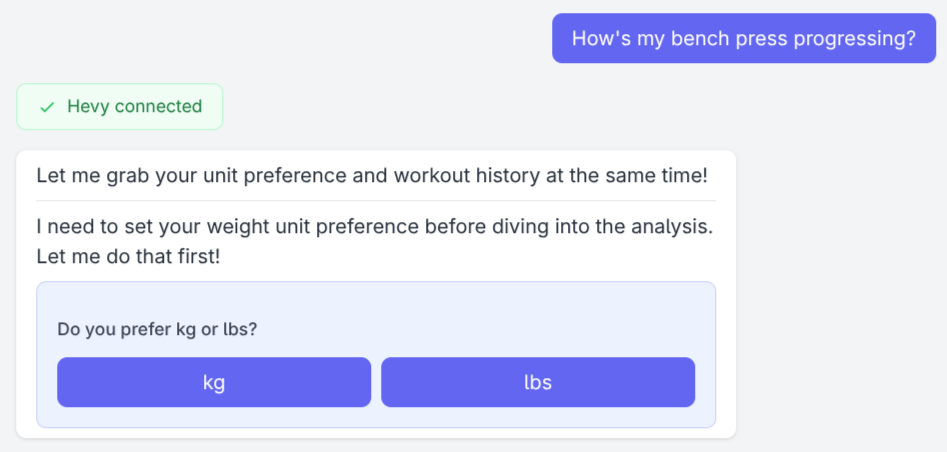
Two buttons instead of a typed answer. Easier on the user, easier on the AI.
I have a few AI chatbot projects, but I hit this first in PushForward (a conversational AI fitness coach I’m building). I needed the user’s Hevy API key before it could pull their workout history. I could have done what most coding agents do: emit a line of text asking for the key, then read whatever comes back as the next message (intercepting the key server-side so it never reaches the model). That works in a terminal, where the agent and the human share one text channel. But I wanted a richer path: a real GUI, with niceties like validations. That raised the actual question: how does a tool prompt the user for input that isn’t text, when the agent runs on a server and the user is on a different machine?
The Category Mismatch
The transport is the whole problem. PushForward streams the agent’s output to the browser over SSE (Server-Sent Events), which is one-directional: server to client. The user’s answer arrives as a separate HTTP request. And HTTP requests are built to start, do a bounded amount of work, and end. A paused agent loop is the opposite: long-lived and stateful.
The mismatch is obvious, so my design was to lean into the HTTP pattern: when a tool needs user input, the loop ends the stream entirely, and a later request opens a fresh one that picks up where the old one stopped.
Naively, that sounds like I needed to implement some new bookkeeping: state management for uncompleted user prompts and some way to stitch the resumed stream back onto the existing conversation. There’s an easier way, though.
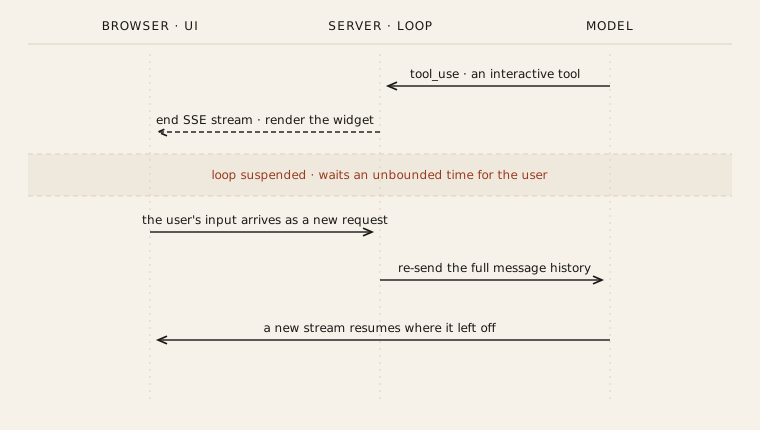
One interactive tool call: the loop ends the stream, the user acts, and a fresh request resumes it.
Resume Comes For Free
Like the other major LLM APIs, Anthropic’s is stateless. Every turn, you re-send the entire message history, and the model holds nothing between calls. So the conversation already is the durable checkpoint. There’s no separate “paused agent” state to persist; the list of messages is the state, and I’m already storing it.
This is the part that felt right, not just convenient. The API’s whole model of the interaction is “you’ll get a tool_result for this tool_use_id eventually.” It doesn’t care whether “eventually” means a function returned or a human clicked through a consent screen. The machinery I’d need to suspend and resume an agent turned out to be the machinery I already had.
A Tool You Hand to the User
An interactive tool couples the normal non-interactive properties (eg schema, name, etc) with a UI. A normal (non-interactive) tool runs server-side and returns a result; an interactive tool emits a UI and gets its result supplied out-of-band.
The model can’t tell the difference between interactive and non-interactive tools; the entire human-in-the-loop detour is invisible to it. The only contract every interactive tool has to honor is this: eventually append a tool_result for that tool_use_id, then re-open the stream. How the UI gets there is wide open.
Two Return Paths
In practice that “how” has split into two shapes. The first is a synchronous form. The agent prompts, the user answers on PushForward’s own endpoint, a callback transforms the answer, and the transformed value becomes the tool_result. The kg-vs-lbs unit preference and the Hevy API key entry both work this way. For unit preference, I store the selection on the user and add it to the AI conversation (“The user uses pounds for weightlifting units”). For the Hevy API key, I validate it, encrypt it for storage, and update the conversation (“The user has set up Hevy access”). In the latter case I also add new tools to the conversation’s arsenal (like get_hevy_workout_history), which opens up the scope of the chat.
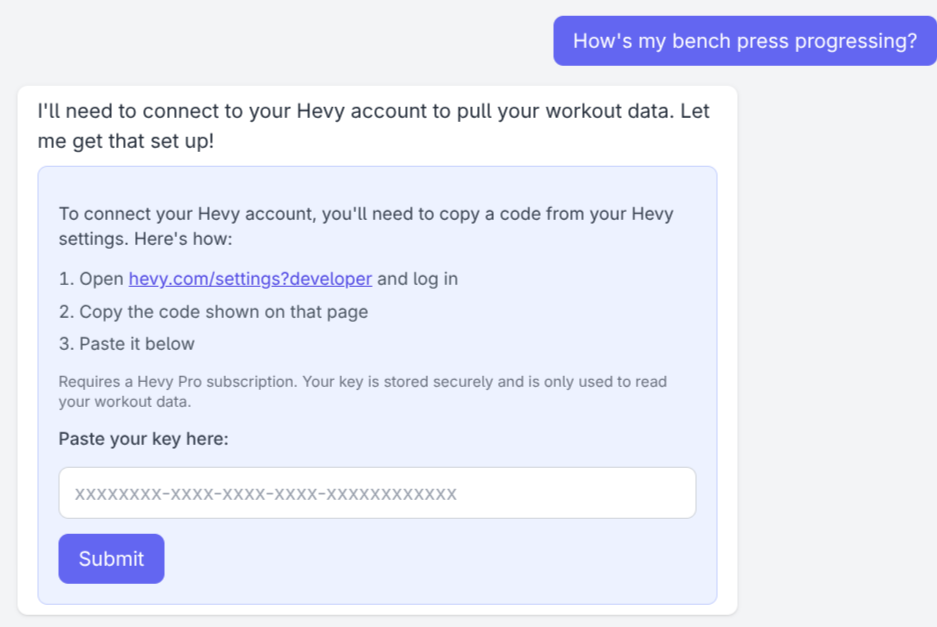
The Hevy API key, entered in a real form and validated before it’s stored.
The second is an external handoff, and OAuth is the case that makes the pattern clear. The interactive tool sends the user to accounts.google.com, where they consent and redirect back through a tool-owned callback that manufactures a fixed tool_result out-of-band.
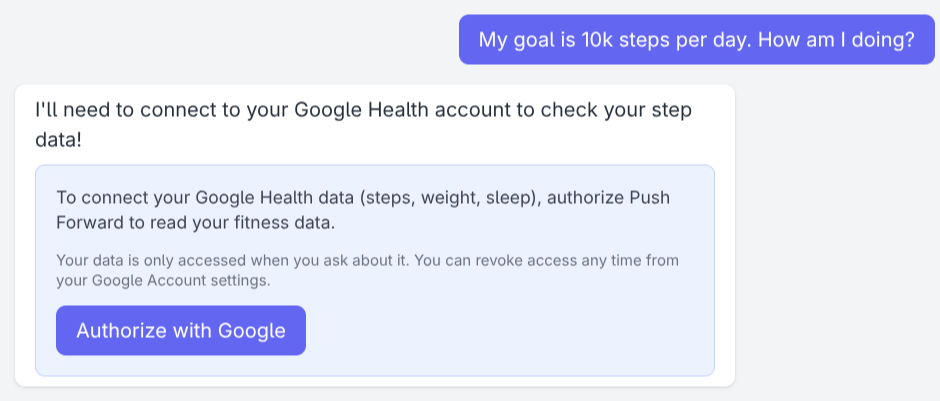
The OAuth handoff: a real button that sends the user to Google’s consent screen.
The Same Shape Shows Up Elsewhere
Once I’d built it, I started noticing the same shape in other people’s tools. LangGraph has an interrupt() function that does structurally the same thing: you call it inside a graph node, the graph checkpoints its state (it makes you wire up a checkpointer for exactly this reason), control returns to the caller, and you resume by re-invoking the graph with a Command carrying the user’s input. Same three moves: persist, pause, resume out-of-band. The difference is mostly where the seam sits. Theirs is a generic graph-node primitive backed by a checkpointer; mine is a tool-level idea backed by the message history the API already makes me keep.
The Outer Loop
Chat interfaces taught all of us to treat text as the whole conversation. It isn’t. Text is just the channel the user reaches for while they’re driving. The moment the agent takes the wheel, it wants what any program wants from a user: a specific choice, a verified credential, a file upload. The conversation is only the outer loop. More and more of what matters happens in the small UIs it pauses to show you.