Braintree 10% Time: LED Strip
At Braintree, the developers get every other Friday to work on non-work-related projects of their choosing. Collaboration is encouraged, but even if you end up working on something alone, it’s a great way to spread your excitement about whatever interests you at the moment (and it’s a nice perk to the job).
This week, my project was to get some LED strips unboxed and working. The strips are flexible circuit boards, with full-color LEDs dotting one side. Each “LED” is actually three LEDs clustered together (one red, one green, one blue), and with 21 control bits, they can display more colors than the human eye can distinguish. I bought a variety of strips, with different features, and I don’t know exactly what I’m going to do with them, but step 1 is to learn how to use them.
To start, I unpacked the coolest strip. It’s from Adafruit, and it’s special because the LEDs are are individually addressable (you can control the color/brightness individually). I won’t describe the process of getting it set up, because adafruit has an excellent tutorial on the subject, with lots of pictures. What may be useful for people that try this project, though, is the mistake I made, the weird behavior that resulted, and the eventual fix.
The Mistake The ribbon has four cables coming off of it. Two go to an Arduino, and they actually control the LEDs. The Arduino, though, doesn’t provide enough power to run all the LEDs, so you need a separate power source. I used a normal wall wart adapter, and connected the appropriate wires to positive and negative on the LED strip. The Arduino was running off of power from the USB. 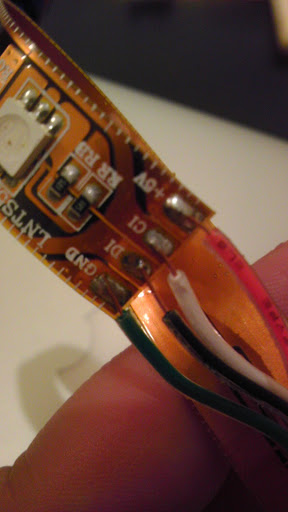
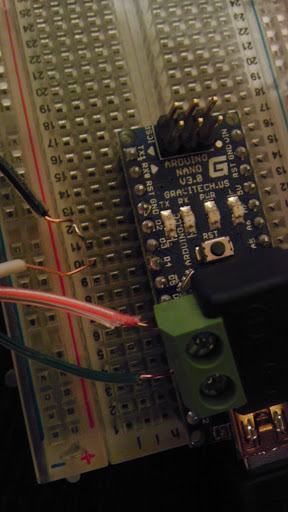
The Weirdness I loaded the example library and code referenced in the tutorial, and all the strip did was flicker brightly. It did not run any patterns or display any clear colors, as I was expecting. Weirder still, when the laptop (macbook air, powering the Arduino through USB) was unplugged from its power source, the strip wouldn’t even flicker, but was just bright white. You can see this strange behavior here: LED Strip, Not Working
The Solution I threw myself on the mercy of the Adafruit forums, and the answer came within a few hours. It turns out I had made a dumb mistake when wiring, and I had not created a common ground between the power source and the Arduino. Here’s the correct wiring (from the above-mentioned tutorial): 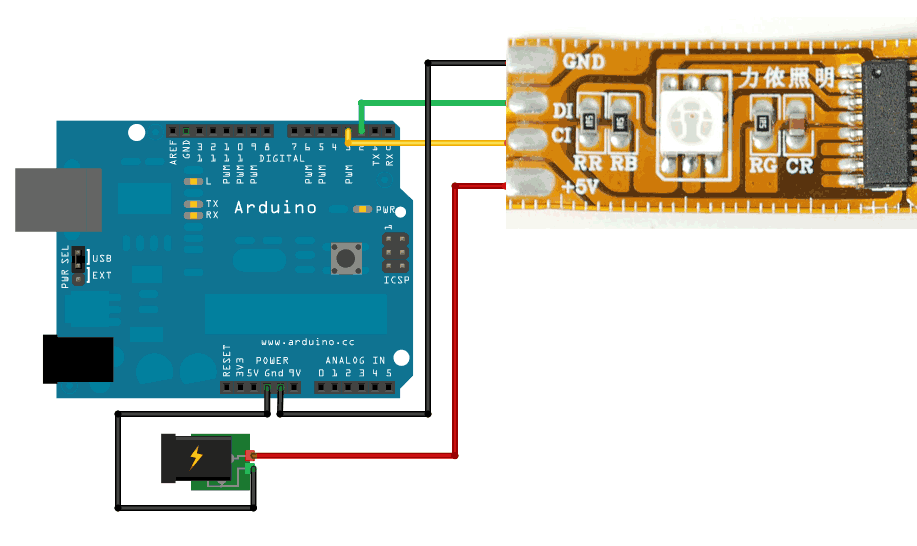 Notice that the ground from the strip goes into the Arduino’s ground, and then comes out another ground port and goes to the ground on the power supply. This creates a reference point that is common to the Arduino and the power supply, and it fixed the problem. Without a common reference point, the Arduino’s data may not be interpreted correctly. The final setup: LED Strip, Working